The Anatomy of Connectivity: A Guide to the Hardware Powering Your Code

As a lay man , we often treat the “network” as an imaginary cloud of data wherein the data magically teleports from one place to another, but as developers, we need to understand the underlying hardware which lies between our servers and the end user, which facilitate this transfer of data.
Understanding these devices isn't just for IT professionals; it’s essential for anyone building scalable, secure, or high-performance systems. Let’s trace the journey of a packet from the street into your data center.
1. The Modem: Your Digital Interpreter
The internet enters your building via a cable, a phone line, or a fiber-optic strand. However, the signals traveling through those lines (analog waves or light pulses) aren't in a format your computer understands.
The Modem (short for Modulator-Demodulator) is the translator. It takes the signals from your Internet Service Provider (ISP) and converts them into digital data (bits) that your local equipment can process.
The Analogy: The Modem is like a universal translator at an embassy. It listens to the foreign language coming from outside and turns it into the local language used inside the building.
Key Responsibility: Connecting your specific local network to the global internet.

2. The Router: The Traffic Police
Once the modem sends the data streams, they need to be “Routed” to all your devices , Router does the job.
It is a complicated computer which directs each data packet to its designated device, by maintaining an internal IP address table. It also assigns local IP addresses (like 192.168.1.5) to your devices so they can talk to each other.
- The Analogy: The Router is the Traffic Police at a busy intersection. It looks at the destination address on every packet and directs it down the correct "street" so it doesn't crash into other data.
Key Responsibility: Directing traffic between different networks (your home network vs. the internet).
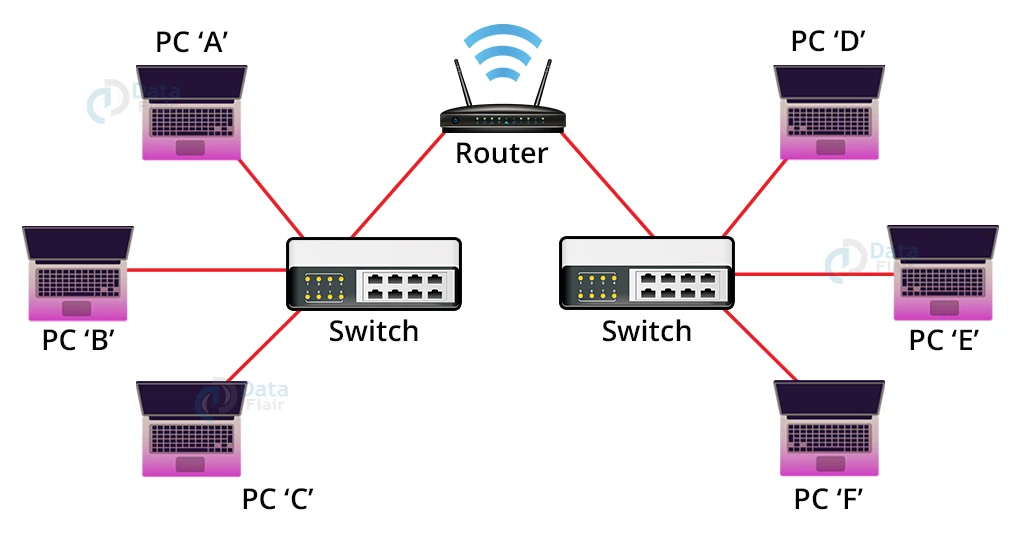
3. Switch vs. Hub: Connecting the Room
Within a single office or server rack, you need to connect many devices together. This is where Switches and Hubs come in. While they look similar, they operate very differently.
The Hub (The "Dumb" Device): A Hub is a basic splitter. When a packet arrives, the Hub broadcasts it to every single device connected to it. The devices then have to ignore the packets not meant for them. This causes massive congestion (collisions).
The Switch (The "Smart" Device): A Switch learns the unique MAC address of every connected device. When a packet arrives for "Laptop A," the Switch sends it only to Laptop A.
The Analogy: A Hub is like a megaphone (everyone hears everything), while a Switch is like a private telephone line (only the recipient hears the message).

4. The Firewall: The Security Gate
Before a packet from the internet is allowed into your precious database or application server, it must be inspected. This is the Firewall's territory.
A Firewall acts as a barrier based on a set of security rules. It monitors incoming and outgoing traffic and can block packets based on their source, destination, or the type of protocol they are using (like blocking everything except web traffic on Port 443).
- The Analogy: The Firewall is the Security Guard at a gated community. If you aren't on the list or you look suspicious, you aren't getting in.
Key Responsibility: Protecting the internal network from unauthorized external access.

5. The Load Balancer: The Toll Booth Manager
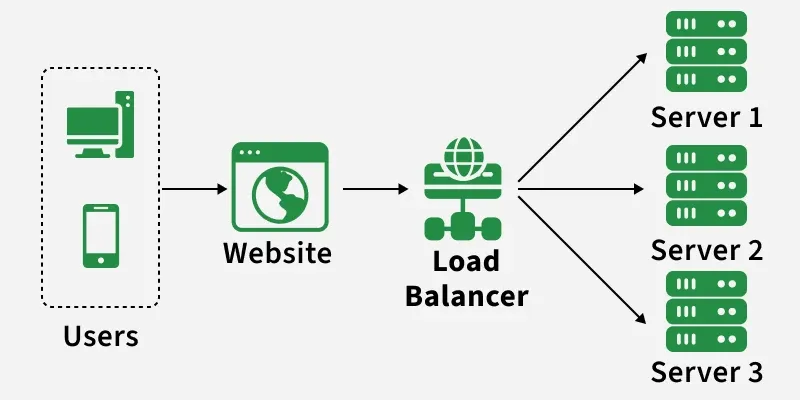
In production environments, a single server can't handle millions of users. You need a fleet of servers. But how do you decide which user goes to which server? You use a Load Balancer.
The Load Balancer sits in front of your server farm. It receives all incoming requests and distributes them across your available servers to ensure no single machine is overwhelmed. It can also "health check" servers—if one crashes, the Load Balancer stops sending traffic to it.
The Analogy: The Load Balancer is like a Toll Booth Manager at a bridge. When cars pile up, the manager opens more lanes and directs cars to the shortest line to keep traffic moving.
Key Responsibility: Ensuring scalability and high availability.
The Big Picture: How They Work Together
In a professional data center or a modern office, these devices form a chain:
ISP Line → Modem (Translates the signal)
Modem → Firewall (Screens for threats)
Firewall → Router (Determines which internal sub-network the data belongs to)
Router → Load Balancer (Decides which specific server should handle the request)
Load Balancer → Switch (Delivers the packet to the physical server blade)
Switch → Server (Your code finally runs!)
Why Software Engineers Should Care
Hardware constraints often dictate software performance. If your application is "slow," the bottleneck might not be your Python code; it could be a saturated Switch backplane, a Firewall struggling with deep packet inspection, or a Load Balancer configured with a sub-optimal algorithm (like Round Robin when your tasks have varying weights).
When you understand the physical path your data takes, you become a better architect. You start thinking about latency, point-of-failure, and packet loss as physical realities, not just abstract concepts.
Comments
Join the discussionNo comments yet. Be the first to comment.


