The Skeleton of the Web: A Beginner’s Guide to HTML

If a website were a house, CSS would be the paint and furniture, JavaScript would be the smart home system, and HTML would be the wooden frame and foundation. Without it, there is no structure.
HTML (HyperText Markup Language) is the standard language used to create the "skeleton" of every page you see on the internet. It tells the browser exactly what the content is—whether it’s a heading, a paragraph, or a button.
What is an HTML Tag?
Think of an HTML tag as a label. Just like you might label a box "Kitchen Supplies," you use tags to tell the browser, "This text is a Heading."
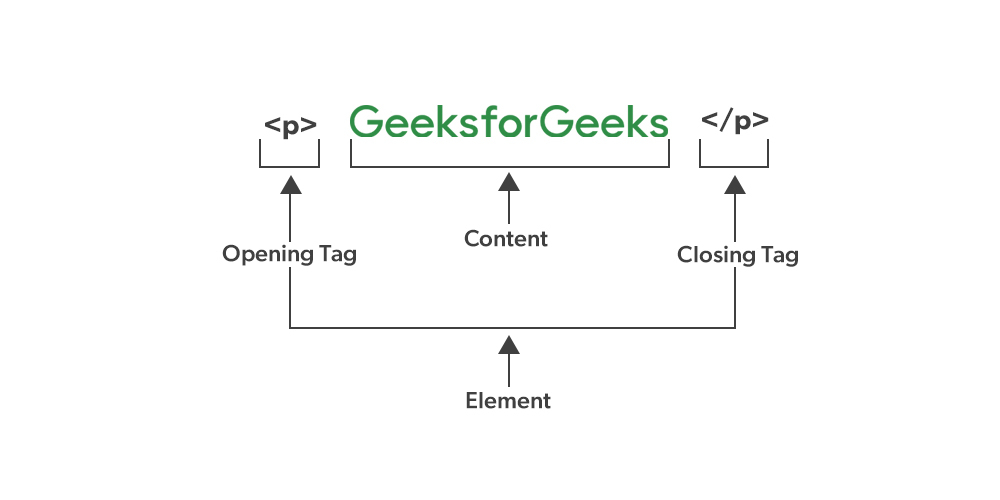
Most tags come in pairs to wrap around the content they are describing. This structure consists of three parts:
Opening Tag:
<tagname>(Starts the instruction)Content: The actual text or image being displayed.
Closing Tag:
</tagname>(Ends the instruction—notice the forward slash!)The Box Analogy: Imagine an HTML tag as a physical box. The Opening Tag is the front of the box, the Content is what you put inside, and the Closing Tag is the back of the box that seals it shut.
Tag vs. Element: What’s the Difference?
These terms are often used interchangeably, but there is a slight technical difference:
Tag: Just the markers (
<p>or</p>).Element: The whole package. It includes the opening tag, the content, and the closing tag combined.
Self-Closing (Void) Elements
Not every "box" needs a back lid. Some elements don't contain any text or other tags; they just represent a single thing on the page. These are called Self-closing or Void elements.
Common examples include:
<br>: A simple line break.<img>: An image.<hr>: A horizontal thematic line.
Block-Level vs. Inline Elements
To build a good layout, you need to understand how elements sit next to each other.
1. Block-level Elements
These are the "greedy" elements. They always start on a new line and take up the full width available (like a brick in a wall).
- Examples:
<div>,<h1>through<h6>,<p>,<ul>.
2. Inline Elements
These are "social" elements. They only take up as much width as necessary and allow other elements to sit right next to them (like words in a sentence).
Examples:
<span>,<a>(links),<strong>(bold).
Commonly Used HTML Tags
Here are the "Big Four" you will use in almost every project:
| Tag | Name | Purpose |
<h1> | Heading 1 | The main title of the page. |
<p> | Paragraph | For blocks of text. |
<div> | Division | A container used to group other elements together (Block-level). |
<span> | Span | A container used for small bits of text inside a paragraph (Inline). |
See It for Yourself!
The best way to learn HTML isn't just by reading—it's by "breaking" things.
Open any website (like this one).
Right-click anywhere on the page.
Select "Inspect" or "Inspect Element."
A window will pop up showing the HTML skeleton of that site. You can even double-click on a line of code, change the text, and see it update instantly on your screen! (Don't worry, you aren't actually hacking the site; you're just changing your local view).


